COPPER

A PS Audio Publication

Issue 167 • Free Online Magazine

Issue 167 Featured

Getting the Most from an A/V Receiver: Yamaha’s Web Editor SetUp Tool, Part Two

Getting the Most from an A/V Receiver: Yamaha’s Web Editor SetUp Tool, Part Two

In Part One (Issue 166), we briefly covered some of the highlights of the Yamaha Web Editor SetUp online utility, which is designed to get the best sonic performance from an Yamaha A/V receiver. In this last installment we will look at the advantages of the latest version of Yamaha’s higher-end AVENTAGE A/V receiver firmware, and also how you can get the best if you have an older software version.

In particular, let’s look at editing the PEQ, or Parametric EQ, settings via the drop-down menus. The degree of functionality and control provided by a precise parametric EQ program is a very useful and powerful way of managing the problem frequencies and dips and peaks in your room’s frequency response. (See my articles in Issue 158 and Issue 159 for additional information.) Software such as REW Room EQ Wizard is extremely useful in measuring your room’s behavior. The results obtained from a program like REW can then be used to enter parameters into the Web Editor SetUp menus, or a similar online setup program for other A/V receiver brands.

One of the advantages of Yamaha’s Web Editor SetUp is that you can make adjustments to your system without having to be in the listening room (or one of the multi-room zones if the receiver has multiroom audio capability). The adjustments are executed in real time, so, on the other hand, if you are in the listening room you can immediately hear any changes you make. You may then save your settings.

What’s new with the latest Web Editor SetUp version compared to the older one? Significantly, you may select from more PEQ frequency ranges for even more precise fine-tuning. There is a new skin for the interface, which is easier to read and navigate, with larger fields and “sliders” for data entry. (At the time of this writing there’s, no way to minimize the fields that are of no interest to you, such as for channels of speakers that you do not have connected, so you have to scroll down to the elements you want to edit. This may be updated in a future firmware update but is a minor point compared to the abundance of controls and ease of editing provided.)


Yamaha Web Editor SetUp, screen shot of parametric EQ (PEQ) menu.

Yamaha Web Editor SetUp, screen shot of parametric EQ (PEQ) menu.


The software was developed primarily for sound installation engineers and system integrators. Having said this, it’s so easy to use and to hear the results of the sonic adjustments, that I encourage anyone who has a compatible Yamaha receiver, or other receiver brand that allows system setup via the web, to try it. Just remember to turn on your receiver first, because you can access the online editor app even if the receiver itself is turned off. Also, make sure you are on the same network as your receiver.

Although some users may prefer the visualization provided by the on-screen plotted graphical display, which is excellent, the power of the Web Editor SetUp app in fine-tuning specific problem frequencies may yield far more precise results than the standard on-screen menu can provide. Note that REW (or perhaps a similar program) most likely will provide far more precise measurements than you’ll be able to adjust for in Web Editor SetUp, but you can get very close. So close, that the edits made would likely be more than granular enough to effect changes far more subtle than you could audibly discern by the time you take Q factor, dB and frequency at any chosen bandwidth into account. It is that refined.

In fact, REW offers even more detail than you should perhaps implement. Why? You may not be able to even hear the differences in frequency response between very close frequencies. The temptation can be to adjust for tiny peaks and dips that are masked by the overall sound being output, but which would make no real-world audible difference.

Please also remember that these measurements are made with a microphone and not human ears, which play a huge factor in what is seen on a measurement graph compared to what we are actually hearing. Also, the microphone may not be picking up frequencies above 20 kHz that are in fact being output by the tweeter. As a result, if you try to adjust for “flat” high-frequency response as indicated by the measurements, you may wind up frying your tweeter. Conversely, trying to boost weak or nonexistent low-bass frequencies may put too much demand on the woofers’ and subwoofer’s driver excursion, or the ability of the power amplifier(s), to deliver enough output.

There are also limitations with the Web Editor SetUp app itself. You can’t select whichever frequency you want to edit, as with parametric EQs for recording studio use – there is a fixed selection of EQ points available. That said, the app offers a higher than ever degree of granular control and a better ability to zero in on problem frequencies. It will likely be far more than adequate for your requirements. How so? The newest firmware provides adjustment from as low as 15.6 Hz, for more-complete bass management. As an example of the surgical precision the app affords, you may now may adjust frequencies at 15.6 Hz, 16.6 Hz, 17.7 Hz, 18.6 Hz, 19.7 Hz, 20.9 Hz, 22.1 Hz (and upward).

Even the older version of the app offers 28 dedicated frequency bandwidths at one-third octave intervals, with control over the Q (the ratio of the center frequency to the bandwidth) starting at 31.3 Hz.

In addition, if you select the “Low Frequency” drop-down menu on the far right of the page under the PEQ menu, you now are presented with a real-time visual display of up to seven bandwidth edits. This means you may now see what you are doing in the online editor App without being obligated to switch to use your TV to view the edits as made through the receiver directly. Previously, this was the only way you could “see” your edits plotted. Now it’s in the online setup, which is much easier and intuitive.
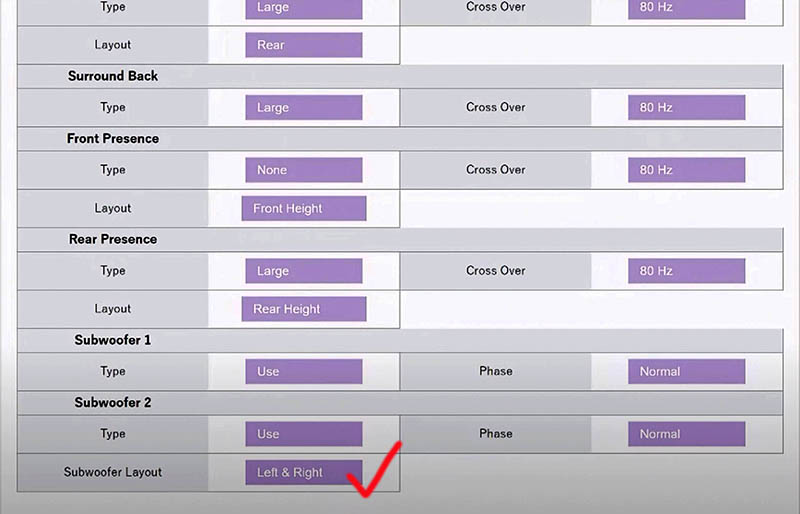
 

Yamaha Web Editor SetUp, screen shot of speaker setup and bass management menu.

Yamaha Web Editor SetUp, screen shot of speaker setup and bass management menu.


With the ability to adjust bass frequencies so finely, pay close attention to how much of a perceived difference you actually notice at 20 Hz, for example, given the bandwidth control you of the Q factor. The Q adjustment has the ability to cover a greater than 2-octave range (Q of.500) down to just a little more than one-eighth of an octave (Q of 10.080). Pinpoint accuracy aside, how much difference can you honestly hear? Getting it technically more accurate does offer a certain satisfaction and peace of mind though. What you certainly don’t want to do is make so many narrow bandwidth adjustments that you end up with a less-smooth waveform!

Our goal should be to make adjustments that are meaningful, but more importantly –perceivable.

There are some other caveats of making multiple adjustments to achieve the supposed holy grail of a completely flat in-room response. One is that more noise can be introduced into the system because of signal degradation and the fact that more amplifier power is required. This may be one reason why Yamaha limits you to seven bandwidths which are editable per speaker channel.


Header image: Yamaha AVENTAGE RZ-A780 A/V receiver.

More from Issue 167

View All Articles in Issue 167

Search Copper Magazine

#227 Seth Lewis Gets in the Groove With Take a Look Around: a Tribute to the Meters by Frank Doris Feb 02, 2026 #227 Passport to Sound: May Anwar’s Audio Learning Experience for Young People by Frank Doris Feb 02, 2026 #227 Conjectures on Cosmic Consciousness by B. Jan Montana Feb 02, 2026 #227 The Big Takeover Turns 45 by Wayne Robins Feb 02, 2026 #227 Music and Chocolate: On the Sensory Connection by Joe Caplan Feb 02, 2026 #227 Singer/Songwriter Chris Berardo: Getting Wilder All the Time by Ray Chelstowski Feb 02, 2026 #227 The Earliest Stars of Country Music, Part One by Jeff Weiner Feb 02, 2026 #227 The Vinyl Beat Goes Down to Tijuana (By Way of Los Angeles), Part Two by Rudy Radelic Feb 02, 2026 #227 How to Play in a Rock Band, 20: On the Road With Blood, Sweat & Tears’ Guitarist Gabe Cummins by Frank Doris Feb 02, 2026 #227 From The Audiophile’s Guide: Audio Specs and Measuring by Paul McGowan Feb 02, 2026 #227 Our Brain is Always Listening by Peter Trübner Feb 02, 2026 #227 PS Audio in the News by PS Audio Staff Feb 02, 2026 #227 The Listening Chair: Sleek Style and Sound From the Luxman L3 by Howard Kneller Feb 02, 2026 #227 The Los Angeles and Orange County Audio Society Celebrates Its 32nd Anniversary, Honoring David and Sheryl Lee Wilson and Bernie Grundman by Harris Fogel Feb 02, 2026 #227 Back to My Reel-to-Reel Roots, Part 26: Half Full – Not Half Empty, Redux by Ken Kessler Feb 02, 2026 #227 That's What Puzzles Us... by Frank Doris Feb 02, 2026 #227 Record-Breaking by Peter Xeni Feb 02, 2026 #227 The Long and Winding Road by B. Jan Montana Feb 02, 2026 #226 JJ Murphy’s Sleep Paralysis is a Genre-Bending Musical Journey Through Jazz, Fusion and More by Frank Doris Jan 05, 2026 #226 Stewardship by Consent by B. Jan Montana Jan 05, 2026 #226 Food, Music, and Sensory Experience: An Interview With Professor Jonathan Zearfoss of the Culinary Institute of America by Joe Caplan Jan 05, 2026 #226 Studio Confidential: A Who’s Who of Recording Engineers Tell Their Stories by Frank Doris Jan 05, 2026 #226 Pilot Radio is Reborn, 50 Years Later: Talking With CEO Barak Epstein by Frank Doris Jan 05, 2026 #226 The Vinyl Beat Goes Down to Tijuana (By Way of Los Angeles), Part One by Rudy Radelic Jan 05, 2026 #226 Capital Audiofest 2025: Must-See Stereo, Part Two by Frank Doris Jan 05, 2026 #226 My Morning Jacket’s Carl Broemel and Tyler Ramsey Collaborate on Their Acoustic Guitar Album, Celestun by Ray Chelstowski Jan 05, 2026 #226 The People Who Make Audio Happen: CanJam SoCal 2025, Part Two by Harris Fogel Jan 05, 2026 #226 How to Play in a Rock Band, 19: Touring Can Make You Crazy, Part One by Frank Doris Jan 05, 2026 #226 Linda Ronstadt Goes Bigger by Wayne Robins Jan 05, 2026 #226 From The Audiophile’s Guide: Active Room Correction and Digital Signal Processing by Paul McGowan Jan 05, 2026 #226 PS Audio in the News by Frank Doris Jan 05, 2026 #226 Back to My Reel-to-Reel Roots, Part 25: Half-Full, Not Empty by Ken Kessler Jan 05, 2026 #226 Happy New Year! by Frank Doris Jan 05, 2026 #226 Turn It Down! by Peter Xeni Jan 05, 2026 #226 Ghost Riders by James Schrimpf Jan 05, 2026 #226 A Factory Tour of Audio Manufacturer German Physiks by Markus "Marsu" Manthey Jan 04, 2026 #225 Capital Audiofest 2025: Must-See Stereo, Part One by Frank Doris Dec 01, 2025 #225 Otis Taylor and the Electrics Delivers a Powerful Set of Hypnotic Modern Blues by Frank Doris Dec 01, 2025 #225 A Christmas Miracle by B. Jan Montana Dec 01, 2025 #225 T.H.E. Show New York 2025, Part Two: Plenty to See, Hear, and Enjoy by Frank Doris Dec 01, 2025 #225 Underappreciated Artists, Part One: Martin Briley by Rich Isaacs Dec 01, 2025 #225 Rock and Roll is Here to Stay by Wayne Robins Dec 01, 2025 #225 A Lifetime of Holiday Record (and CD) Listening by Rudy Radelic Dec 01, 2025 #225 Little Feat: Not Saying Goodbye, Not Yet by Ray Chelstowski Dec 01, 2025 #225 How to Play in a Rock Band, Part 18: Dealing With Burnout by Frank Doris Dec 01, 2025 #225 The People Who Make Audio Happen: CanJam SoCal 2025 by Harris Fogel Dec 01, 2025 #225 Chicago’s Sonic Sanctuaries: Four Hi‑Fi Listening Bars Channeling the Jazz‑Kissa Spirit by Olivier Meunier-Plante Dec 01, 2025

Getting the Most from an A/V Receiver: Yamaha’s Web Editor SetUp Tool, Part Two

Getting the Most from an A/V Receiver: Yamaha’s Web Editor SetUp Tool, Part Two

In Part One (Issue 166), we briefly covered some of the highlights of the Yamaha Web Editor SetUp online utility, which is designed to get the best sonic performance from an Yamaha A/V receiver. In this last installment we will look at the advantages of the latest version of Yamaha’s higher-end AVENTAGE A/V receiver firmware, and also how you can get the best if you have an older software version.

In particular, let’s look at editing the PEQ, or Parametric EQ, settings via the drop-down menus. The degree of functionality and control provided by a precise parametric EQ program is a very useful and powerful way of managing the problem frequencies and dips and peaks in your room’s frequency response. (See my articles in Issue 158 and Issue 159 for additional information.) Software such as REW Room EQ Wizard is extremely useful in measuring your room’s behavior. The results obtained from a program like REW can then be used to enter parameters into the Web Editor SetUp menus, or a similar online setup program for other A/V receiver brands.

One of the advantages of Yamaha’s Web Editor SetUp is that you can make adjustments to your system without having to be in the listening room (or one of the multi-room zones if the receiver has multiroom audio capability). The adjustments are executed in real time, so, on the other hand, if you are in the listening room you can immediately hear any changes you make. You may then save your settings.

What’s new with the latest Web Editor SetUp version compared to the older one? Significantly, you may select from more PEQ frequency ranges for even more precise fine-tuning. There is a new skin for the interface, which is easier to read and navigate, with larger fields and “sliders” for data entry. (At the time of this writing there’s, no way to minimize the fields that are of no interest to you, such as for channels of speakers that you do not have connected, so you have to scroll down to the elements you want to edit. This may be updated in a future firmware update but is a minor point compared to the abundance of controls and ease of editing provided.)


Yamaha Web Editor SetUp, screen shot of parametric EQ (PEQ) menu.

Yamaha Web Editor SetUp, screen shot of parametric EQ (PEQ) menu.


The software was developed primarily for sound installation engineers and system integrators. Having said this, it’s so easy to use and to hear the results of the sonic adjustments, that I encourage anyone who has a compatible Yamaha receiver, or other receiver brand that allows system setup via the web, to try it. Just remember to turn on your receiver first, because you can access the online editor app even if the receiver itself is turned off. Also, make sure you are on the same network as your receiver.

Although some users may prefer the visualization provided by the on-screen plotted graphical display, which is excellent, the power of the Web Editor SetUp app in fine-tuning specific problem frequencies may yield far more precise results than the standard on-screen menu can provide. Note that REW (or perhaps a similar program) most likely will provide far more precise measurements than you’ll be able to adjust for in Web Editor SetUp, but you can get very close. So close, that the edits made would likely be more than granular enough to effect changes far more subtle than you could audibly discern by the time you take Q factor, dB and frequency at any chosen bandwidth into account. It is that refined.

In fact, REW offers even more detail than you should perhaps implement. Why? You may not be able to even hear the differences in frequency response between very close frequencies. The temptation can be to adjust for tiny peaks and dips that are masked by the overall sound being output, but which would make no real-world audible difference.

Please also remember that these measurements are made with a microphone and not human ears, which play a huge factor in what is seen on a measurement graph compared to what we are actually hearing. Also, the microphone may not be picking up frequencies above 20 kHz that are in fact being output by the tweeter. As a result, if you try to adjust for “flat” high-frequency response as indicated by the measurements, you may wind up frying your tweeter. Conversely, trying to boost weak or nonexistent low-bass frequencies may put too much demand on the woofers’ and subwoofer’s driver excursion, or the ability of the power amplifier(s), to deliver enough output.

There are also limitations with the Web Editor SetUp app itself. You can’t select whichever frequency you want to edit, as with parametric EQs for recording studio use – there is a fixed selection of EQ points available. That said, the app offers a higher than ever degree of granular control and a better ability to zero in on problem frequencies. It will likely be far more than adequate for your requirements. How so? The newest firmware provides adjustment from as low as 15.6 Hz, for more-complete bass management. As an example of the surgical precision the app affords, you may now may adjust frequencies at 15.6 Hz, 16.6 Hz, 17.7 Hz, 18.6 Hz, 19.7 Hz, 20.9 Hz, 22.1 Hz (and upward).

Even the older version of the app offers 28 dedicated frequency bandwidths at one-third octave intervals, with control over the Q (the ratio of the center frequency to the bandwidth) starting at 31.3 Hz.

In addition, if you select the “Low Frequency” drop-down menu on the far right of the page under the PEQ menu, you now are presented with a real-time visual display of up to seven bandwidth edits. This means you may now see what you are doing in the online editor App without being obligated to switch to use your TV to view the edits as made through the receiver directly. Previously, this was the only way you could “see” your edits plotted. Now it’s in the online setup, which is much easier and intuitive.


Yamaha Web Editor SetUp, screen shot of speaker setup and bass management menu.

Yamaha Web Editor SetUp, screen shot of speaker setup and bass management menu.


With the ability to adjust bass frequencies so finely, pay close attention to how much of a perceived difference you actually notice at 20 Hz, for example, given the bandwidth control you of the Q factor. The Q adjustment has the ability to cover a greater than 2-octave range (Q of.500) down to just a little more than one-eighth of an octave (Q of 10.080). Pinpoint accuracy aside, how much difference can you honestly hear? Getting it technically more accurate does offer a certain satisfaction and peace of mind though. What you certainly don’t want to do is make so many narrow bandwidth adjustments that you end up with a less-smooth waveform!

Our goal should be to make adjustments that are meaningful, but more importantly –perceivable.

There are some other caveats of making multiple adjustments to achieve the supposed holy grail of a completely flat in-room response. One is that more noise can be introduced into the system because of signal degradation and the fact that more amplifier power is required. This may be one reason why Yamaha limits you to seven bandwidths which are editable per speaker channel.


Header image: Yamaha AVENTAGE RZ-A780 A/V receiver.

0 comments

Leave a comment

0 Comments

Your avatar

Loading comments...

🗑️ Delete Comment

Enter moderator password to delete this comment:

✏️ Edit Comment

Enter your email to verify ownership: