Copper Magazine · Issue 166 · A free PS Audio publication
Issue 166 Featured

Getting the Most From an A/V Receiver: Yamaha’s Web Editor Setup Tool, Part One

Getting the Most From an A/V Receiver: Yamaha’s Web Editor Setup Tool, Part One

Yamaha has recently released a slew of A/V receivers in their higher-end AVENTAGE range, with upgraded power transformers, amplifier circuits and many other features. Some of them offer powerful sound-tailoring capabilities, such as their parametric EQ editor.

For readers who own certain Yamaha A/V receivers, what I am about to discuss may be of no surprise. Users have the ability to configure a compatible Yamaha RX Series or AVENTAGE receiver’s performance for better sound, via the company’s handy and extremely flexible Yamaha Web Editor SetUp page.

If your compatible Yamaha AVR is connected to your home network, you’ll have the ability to dive in and fine-tune its EQ and other sound parameters via the Yamaha Web SetUp page, which you can access via entering your own AV’s IP-specific address followed by typing in the word “setup,” as in this example (instead of “xxx” you’ll put in your unit’s server address from your home network): http://192.168.0.xxx/setup/

If you don’t own a Yamaha receiver, you may find what I’m about to discuss to be useful anyway, since many brands of A/V receivers have similar internet connectivity and room-correction setup capabilities.

Yamaha’s room-correction system is known as YPAO, or Yamaha Parametric room Acoustic Optimizer. Using a calibration microphone and test tones, it automatically adjusts a multichannel audio system’s speakers for level, phase, speaker size, and the distances of the speakers from the listener. In more advanced versions, it can apply EQ to compensate for the peaks and dips in frequency response, especially in the bass, that are encountered in every listening room. High-end Yamaha AVENTAGE receivers can even determine the optimum locations for the height-channel speakers in a Dolby Atmos immersive audio setup.

With the app, which is very slick and features a number of configurable EQ and other control capabilities, it’s possible to configure the receiver without even having to be in the same room as your speakers. (Some older Yamaha models won’t have the computer-control capability, but all YPAO-equipped receivers will have access to the utility via on-screen menu. Some also allow access to YPAO using a mobile app.)
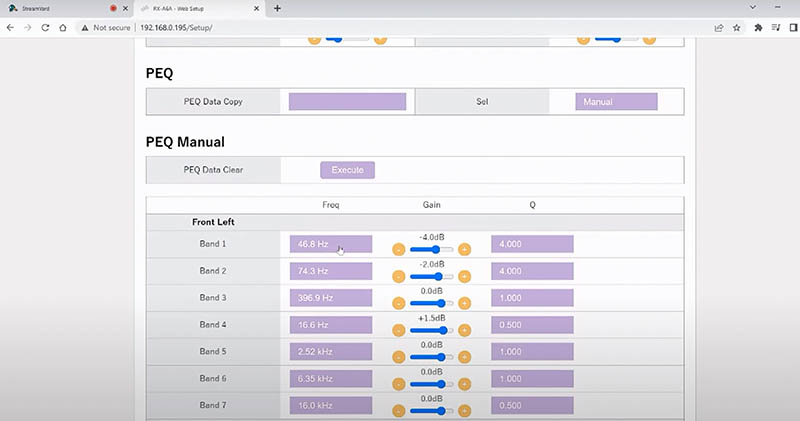
 

Yamaha Web Editor parametric EQ setup screen.

Yamaha Web Editor parametric EQ setup screen.


Like other room-calibration programs, YPAO works by assessing the different volume levels of different frequencies as output by a test signal through each speaker. Interestingly, Yamaha’s YPAO room correction typically operates by turning down, or perhaps more accurately, attenuating certain unwanted frequencies, rather than boosting frequencies that are lower in volume in order to attain a flat in-room response. And this makes good sense.

When it comes to food, I know I often prefer a greater number of skinny fries compared to the same amount of potato prepared as fewer chunky fries. Why? Because the greater ratio of deliciously fat-coated-surface-area-to-potato-content of the thinner fries holds more flavor than chunky versions. (I’m not adverse to triple-cooked fat fries, but I do love skinny ones. In moderation!) Enough about food! What about improving the sound of the system?

As noted, Yamaha offers three main interfaces for using YPAO: 1) the computer network interface which we are considering here (this requires either a laptop or desktop computer) on your home WIFI network; 2) a mobile or tablet device application, and 3); an on-screen TV graphical display which provides a visualization of the edits you make. The graphical visualization (provided by the TV’s on-screen display interface) displays your EQ curve adjustments so you can see what your raw data input curve looks like which you have input in the online editor setup. This is very helpful because it allows you to see how smooth (or not) your curves look rather than just giving a cold number as per the online setup interface.

The beauty of the online interface, though, is that if you want to tweak the results of the EQ to personal taste, you can very easily just enter a numerical value, rather than using the clunkier cursor required by the standard on-screen menu. You can save your edits for different listening purposes, such as for daytime or nighttime listening, or different jazz, metal, jazz-metal, (you get the picture), or other genres – even save settings for a specific album. Generally, you’ll most likely want to set up a curve that will be suitable for the majority of your listening.

You’ll soon discover a raft of additional editable options. Here are a few I have benefitted from:

Turning on dynamic range compression (DRC) can level out the extremes of your listening volume thresholds, which may be useful for late-night listening to recordings with extreme dynamic range, especially when others are in the house asleep or you have cantankerous neighbors. There are options to set the threshold of volume limiting applied.

An Extra Bass feature can be useful in matching the bass output from your main speakers to a subwoofer. It’s probably best not to turn this on if your main speakers are set to “Small” in the speaker setup menu (when using smaller speakers with limited bass output, say below 60 to 90 Hz, the low frequencies are typically routed to the subwoofer) I have my speakers set to “Large” because I enjoy listening to their full-range output and having the subwoofer come up to meet them in a complimentary way, rather than limiting the low-frequency content that is sent to the main speakers. (For more on the subject of setting an A/V receiver’s speaker settings to “Large” or “Small,” see my “One Size Fits All?” articles in Issue 150 and Issue 151.)

With the Yamaha AVENTAGE A/V setup utility, you also have support for true stereo bass, instead of summing all the bass to mono, even if you have more than one subwoofer, as is the case with some other A/V receivers. This may be significant if you don’t want to miss out on the joy that is true stereo bass. (If you set your subwoofer configuration to Left and Right, both subs will still deliver the LFE – low-frequency effects – channel in mono, but otherwise keep true stereo bass frequencies. What this means is that you may then set your stereo bass crossovers at a higher frequency and avoid obvious localization issues. Perhaps start out at 90 Hz and experiment up to 150 Hz and see what works best for you in your room, keeping in mind that at higher frequencies of say 90 Hz and above, particularly if you are using only one subwoofer, you might hear unwanted localization of the subwoofers. If you are using multiple subs, particularly at lower crossover ranges below 90 Hz, localization issues are usually far less impactful.
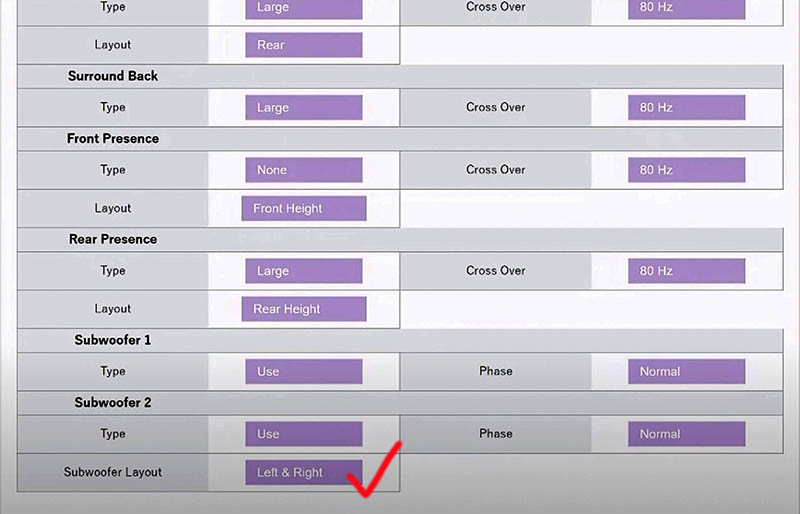
 

The menu offers a stereo bass setup option.

The menu offers a stereo bass setup option.


The utility also offers the traditional wide-ranging bass and treble tone controls if you want to make quick general adjustments. It also provides an input trim function via the online set up which is useful for matching the volume levels of different input sources. Similarly, you can set the receiver’s maximum volume setting to avoid unwanted excessive volume…or worse…

If you’ve ever heard people complain about the apparent redundancy of Yamaha’s DSP surround-sound modes, maybe it’s because they haven’t heard these virtual sonic environments at their best. The Yamaha Online Setup Editor enables tweaking of the DSP parameters including the room size and “liveliness” among others. If, like me, you have found some of the presets to be too “full on,” try backing the effect level down and experimenting with the room size setting. It’s also fun to hear the Hall in Vienna scaled down, or New York’s Bottom Line made bigger. You may surprise yourself. The Role Playing gaming mode has a very compressed and punchy personality which you may enjoy when applied to rock, jazz-rock and metal.

Another hidden gem of a feature is the ability to assign the stereo-to- surround sound up-mixing of your 2.1 sources to 5.1 or greater, for each audio source.

In Part Two we will look more at the available parametric equalizer settings, which allow for really precise fine-tuning.

Header image: Yamaha AVENTAGE RX-A8A 11.2-channel A/V receiver.

More from Issue 166

View All Articles in Issue 166

Search Copper Magazine

#236 Magic Boy: The Jimi Hendrix Experience, Live and Rediscovered by Frank Doris Nov 02, 2026 #236 The Great Rhythmic Divide: Composer David Chesky Asks, Why Doesn't the Symphony Orchestra Groove? by David Chesky Nov 02, 2026 #236 More Record Reviews: Roni Eytan’s Microtonal Harmonica, Jane Ira Bloom, and a Frank Zappa Freak Out by Frank Doris Nov 02, 2026 #236 An Album of Inviting Beauty: Goodnight Moon from Acoustic Eidolon, And an Interview With the Artists Who Created it by Frank Doris Nov 02, 2026 #236 Never Ignore Your Inner Voice by B. Jan Montana Nov 02, 2026 #236 Composer Joseph Bertolozzi Uses Bridges, Structures and the World as Musical Instruments, Part One by Joe Caplan Nov 02, 2026 #236 Transmission: A Powerful Horn-Loaded Album from the Huntertones by Ray Chelstowski Nov 02, 2026 #236 Les Quatre Saisons du Québec: a New “Four Seasons” on Tour and on ATMA Classique by Robert Schryer Nov 02, 2026 #236 From The Audiophile's Guide: A Glossary of Terms for Today's Audio Systems, A – M by Paul McGowan Nov 02, 2026 #236 From The Listening Chair: An Introduction to Audiophile Tweaks by Howard Kneller Nov 02, 2026 #236 The Vinyl Beat Grew Two Inches Since October! by Rudy Radelic Nov 02, 2026 #236 How to Play in a Rock Band, Part 29: Figuring Out How to Play the Songs by Frank Doris Nov 02, 2026 #236 The Return of the Residents: Eskimo is On the Road by Wayne Robins Nov 02, 2026 #236 PS Audio in the News by PS Audio Staff Nov 02, 2026 #236 The People Who Make Audio Happen – Fun In Las Vegas at…CES 2026? by Harris Fogel Nov 02, 2026 #236 The Forms of Things Unknown by Frank Doris Nov 02, 2026 #236 Prophetic by Peter Xeni Nov 02, 2026 #236 Here's Looking at You, Kid by Rich Isaacs Nov 02, 2026 Favorites From T.H.E. Show SoCal 2026 by Cam Martin Oct 05, 2026 #235 Singer/Songwriter John David Schrader: On the Need to Create, Part Two by Joe Caplan Oct 05, 2026 #235 A Life in High-End Audio: The Roy Hall Interview, Part Two by Frank Doris Oct 05, 2026 #235 Grammy-Winning Producer, Songwriter, and Guitarist John Leventhal Goes Instrumental With National Drift by Ray Chelstowski Oct 05, 2026 #235 From Swimming Pool to New Listening Room—to Founding an Accidental Audio Company by Gilles Laferrière Oct 05, 2026 #235 The Vinyl Beat’s Size Matters Edition by Rudy Radelic Oct 05, 2026 #235 The Sublime Complexities of Nature by B. Jan Montana Oct 05, 2026 #235 How to Play In a Rock Band, 28: Growing Older and Dealing With It by Frank Doris Oct 05, 2026 #235 Young Rascals: From Bar Band to Stardom by Wayne Robins Oct 05, 2026 #235 Duncan Sheik: In Memoriam by Ray Chelstowski Oct 05, 2026 #235 From The Listening Chair: The Meze Audio 105 Silva Headphones by Howard Kneller Oct 05, 2026 #235 Checking Out Some NOLA Loudspeakers – and Some Thoughts About Audio Writing by Frank Doris Oct 05, 2026 #235 The Kanazawa Phonograph Museum: Music from a Time Capsule by Sebastian Polcyn Oct 05, 2026 #235 PS Audio in the News by PS Audio Staff Oct 05, 2026 #235 From The Audiophile’s Guide: Making the Most Critical Choice by Paul McGowan Oct 05, 2026 #235 Evolutionary Growth by Frank Doris Oct 05, 2026 #235 Speed Racer by Peter Xeni Oct 05, 2026 #235 Happy Halloween! by James Schrimpf Oct 05, 2026 #234 A Life in High-End Audio: The Roy Hall Interview, Part One by Frank Doris Sep 07, 2026 #234 Jason Greenlaw Offers His Personal Perspective on Jazz Guitar in Vantage Point by Frank Doris Sep 07, 2026 #234 Transcendent Phoenix: Lucina Yue Brings the Ancient Konghou Into Modern Times by Frank Doris Sep 07, 2026 #234 We Must All Follow Our Bliss by B. Jan Montana Sep 07, 2026 #234 How to Play in a Rock Band, 27: Leveling Up by Frank Doris Sep 07, 2026 #234 Ross Valory: Traveling Into New Musical Territory With All of the Above by Ray Chelstowski Sep 07, 2026 #234 Singer/Songwriter John David Schrader: On the Need to Create by Joe Caplan Sep 07, 2026 #234 The People Who Make Audio Happen: More From T.H.E. Show SoCal 2026 by Harris Fogel Sep 07, 2026 #234 The Vinyl Beat Digs Into the Gadget Box by Rudy Radelic Sep 07, 2026 #234 The Rolling Stones: Foreign Tongues Spoken Loud by Wayne Robins Sep 07, 2026 #234 Musical Moments by Rich Isaacs Sep 07, 2026

Getting the Most From an A/V Receiver: Yamaha’s Web Editor Setup Tool, Part One

Getting the Most From an A/V Receiver: Yamaha’s Web Editor Setup Tool, Part One

Yamaha has recently released a slew of A/V receivers in their higher-end AVENTAGE range, with upgraded power transformers, amplifier circuits and many other features. Some of them offer powerful sound-tailoring capabilities, such as their parametric EQ editor.

For readers who own certain Yamaha A/V receivers, what I am about to discuss may be of no surprise. Users have the ability to configure a compatible Yamaha RX Series or AVENTAGE receiver’s performance for better sound, via the company’s handy and extremely flexible Yamaha Web Editor SetUp page.

If your compatible Yamaha AVR is connected to your home network, you’ll have the ability to dive in and fine-tune its EQ and other sound parameters via the Yamaha Web SetUp page, which you can access via entering your own AV’s IP-specific address followed by typing in the word “setup,” as in this example (instead of “xxx” you’ll put in your unit’s server address from your home network): http://192.168.0.xxx/setup/

If you don’t own a Yamaha receiver, you may find what I’m about to discuss to be useful anyway, since many brands of A/V receivers have similar internet connectivity and room-correction setup capabilities.

Yamaha’s room-correction system is known as YPAO, or Yamaha Parametric room Acoustic Optimizer. Using a calibration microphone and test tones, it automatically adjusts a multichannel audio system’s speakers for level, phase, speaker size, and the distances of the speakers from the listener. In more advanced versions, it can apply EQ to compensate for the peaks and dips in frequency response, especially in the bass, that are encountered in every listening room. High-end Yamaha AVENTAGE receivers can even determine the optimum locations for the height-channel speakers in a Dolby Atmos immersive audio setup.

With the app, which is very slick and features a number of configurable EQ and other control capabilities, it’s possible to configure the receiver without even having to be in the same room as your speakers. (Some older Yamaha models won’t have the computer-control capability, but all YPAO-equipped receivers will have access to the utility via on-screen menu. Some also allow access to YPAO using a mobile app.)


Yamaha Web Editor parametric EQ setup screen.

Yamaha Web Editor parametric EQ setup screen.


Like other room-calibration programs, YPAO works by assessing the different volume levels of different frequencies as output by a test signal through each speaker. Interestingly, Yamaha’s YPAO room correction typically operates by turning down, or perhaps more accurately, attenuating certain unwanted frequencies, rather than boosting frequencies that are lower in volume in order to attain a flat in-room response. And this makes good sense.

When it comes to food, I know I often prefer a greater number of skinny fries compared to the same amount of potato prepared as fewer chunky fries. Why? Because the greater ratio of deliciously fat-coated-surface-area-to-potato-content of the thinner fries holds more flavor than chunky versions. (I’m not adverse to triple-cooked fat fries, but I do love skinny ones. In moderation!) Enough about food! What about improving the sound of the system?

As noted, Yamaha offers three main interfaces for using YPAO: 1) the computer network interface which we are considering here (this requires either a laptop or desktop computer) on your home WIFI network; 2) a mobile or tablet device application, and 3); an on-screen TV graphical display which provides a visualization of the edits you make. The graphical visualization (provided by the TV’s on-screen display interface) displays your EQ curve adjustments so you can see what your raw data input curve looks like which you have input in the online editor setup. This is very helpful because it allows you to see how smooth (or not) your curves look rather than just giving a cold number as per the online setup interface.

The beauty of the online interface, though, is that if you want to tweak the results of the EQ to personal taste, you can very easily just enter a numerical value, rather than using the clunkier cursor required by the standard on-screen menu. You can save your edits for different listening purposes, such as for daytime or nighttime listening, or different jazz, metal, jazz-metal, (you get the picture), or other genres – even save settings for a specific album. Generally, you’ll most likely want to set up a curve that will be suitable for the majority of your listening.

You’ll soon discover a raft of additional editable options. Here are a few I have benefitted from:

Turning on dynamic range compression (DRC) can level out the extremes of your listening volume thresholds, which may be useful for late-night listening to recordings with extreme dynamic range, especially when others are in the house asleep or you have cantankerous neighbors. There are options to set the threshold of volume limiting applied.

An Extra Bass feature can be useful in matching the bass output from your main speakers to a subwoofer. It’s probably best not to turn this on if your main speakers are set to “Small” in the speaker setup menu (when using smaller speakers with limited bass output, say below 60 to 90 Hz, the low frequencies are typically routed to the subwoofer) I have my speakers set to “Large” because I enjoy listening to their full-range output and having the subwoofer come up to meet them in a complimentary way, rather than limiting the low-frequency content that is sent to the main speakers. (For more on the subject of setting an A/V receiver’s speaker settings to “Large” or “Small,” see my “One Size Fits All?” articles in Issue 150 and Issue 151.)

With the Yamaha AVENTAGE A/V setup utility, you also have support for true stereo bass, instead of summing all the bass to mono, even if you have more than one subwoofer, as is the case with some other A/V receivers. This may be significant if you don’t want to miss out on the joy that is true stereo bass. (If you set your subwoofer configuration to Left and Right, both subs will still deliver the LFE – low-frequency effects – channel in mono, but otherwise keep true stereo bass frequencies. What this means is that you may then set your stereo bass crossovers at a higher frequency and avoid obvious localization issues. Perhaps start out at 90 Hz and experiment up to 150 Hz and see what works best for you in your room, keeping in mind that at higher frequencies of say 90 Hz and above, particularly if you are using only one subwoofer, you might hear unwanted localization of the subwoofers. If you are using multiple subs, particularly at lower crossover ranges below 90 Hz, localization issues are usually far less impactful.


The menu offers a stereo bass setup option.

The menu offers a stereo bass setup option.


The utility also offers the traditional wide-ranging bass and treble tone controls if you want to make quick general adjustments. It also provides an input trim function via the online set up which is useful for matching the volume levels of different input sources. Similarly, you can set the receiver’s maximum volume setting to avoid unwanted excessive volume…or worse…

If you’ve ever heard people complain about the apparent redundancy of Yamaha’s DSP surround-sound modes, maybe it’s because they haven’t heard these virtual sonic environments at their best. The Yamaha Online Setup Editor enables tweaking of the DSP parameters including the room size and “liveliness” among others. If, like me, you have found some of the presets to be too “full on,” try backing the effect level down and experimenting with the room size setting. It’s also fun to hear the Hall in Vienna scaled down, or New York’s Bottom Line made bigger. You may surprise yourself. The Role Playing gaming mode has a very compressed and punchy personality which you may enjoy when applied to rock, jazz-rock and metal.

Another hidden gem of a feature is the ability to assign the stereo-to- surround sound up-mixing of your 2.1 sources to 5.1 or greater, for each audio source.

In Part Two we will look more at the available parametric equalizer settings, which allow for really precise fine-tuning.

Header image: Yamaha AVENTAGE RX-A8A 11.2-channel A/V receiver.

0 comments

Leave a comment

0 Comments

Your avatar

Loading comments...

🗑️ Delete Comment

Enter moderator password to delete this comment:

✏️ Edit Comment

Enter your email to verify ownership: