
Find out what’s making the noise
We first need to divide our search into two categories; mechanical or electrical induced hum. A mechanically induced hum or buzz is equally easy to determine. Place your ear very near to each piece of your electrical equipment and again, listen for hum and buzz. If you hear a hum emanating from within your equipment, we would refer to this as mechanically induced noise (as opposed to an electrically induced noise). To see if it is an electrical problem, make sure your system has been on and warmed up for at least 10 minutes, then simply place your ear near the loudspeaker (with no music playing) and listen to determine if the hum or buzz is coming from your speaker. If it is, then at least one component of your problem is electrical. This is the most common and usually caused from a ground loop.Ground loop hum
Ground loops hums are perhaps the most tedious to track down – yet they are by far the most common. You typically have a ground loop when the hum or buzz comes out of your loudspeakers. Ground loops are a result of differing ground potentials. This means that the ground of one AC source or equipment source is at a different level than the ground of another AC source or equipment. This difference is usually amplified in the form of audible or visible hum. Visible hum is usually seen as diagonal bars across the video screen. Tracking these types of hums down is more difficult and below we have assembled some helpful tips. It is critically important you follow these steps one at a time and don’t miss any.Tracking down ground loop problems
The easiest way to figure out where ground loop problems lie is by the process of elimination. You need to determine where the hum or buzz is coming from within your system. If it’s a video hum problem, use a known good source like a DVD player rather than cable or satellite. In video, it’s best to always assume that it’s either a connection problem or, more likely, a cable problem. Our experience has shown that poorly shielded video cables cause more hum problems than just about anything else. In an audio situation, the first suspect in our hunt would be the power amp or the receiver that is driving the loudspeaker. To see if the power amp or the receiver is the culprit, turn them off, disconnect its inputs and turn it back on again. Go back to the speaker and place your ear in close proximity to see if the hum is still there. If it is, then you have a problem with your power amp or receiver and you should seek help from its manufacturer. If the hum/buzz goes away when you remove the inputs to the power amp, your next step will be to reconnect the amp and move further down the chain. If you were working with a receiver or an integrated amplifier, you will need to jump to step 4. If you have a preamp, or processor that is feeding the power amp, your next step would be to disconnect all inputs to the preamplifier or processor. Once these are disconnected, and the preamp or processor is connected only to the power amplifier, turn the system on and again, listen for hum. Should the hum now appear, it is a problem with your preamp or processor or their interaction with the power amp. Before returning the preamp or processor to the manufacturer, try a cheater plug to break a ground loop. Cheater plugs are simple devices that convert a three prong AC plug into a two prong AC plug and in the act of converting three prongs, to two prongs, they disconnect the ground from the wall socket. Try one of these on the preamp, or the power amp, or both. If an AC cheater plug work, replace it with a HUM X. Using a cheater plug may not be the safest alternative.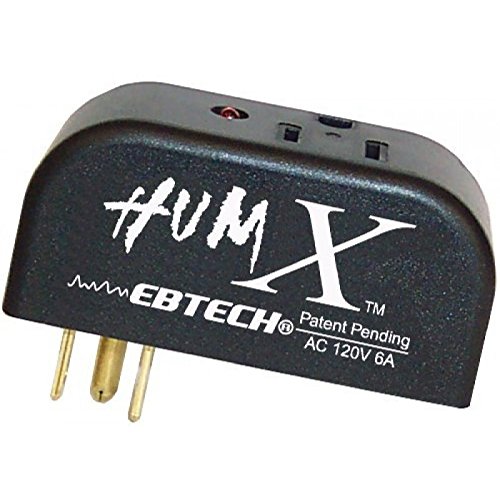 If you determine that there is still no hum present when the preamp, processor or receiver is connected with no inputs, then selectively begin plugging in your various inputs one at a time. After each connection, check for hum until you discover the humming culprit.
VCR’s, surround processors, streaming audio, and any device that is connected to a television cable can cause a loud buzz and should always be suspect. If, by the process of elimination described above, you determine it is a component like a modem or television connected via a cable connection (CATV) that is causing the hum, use a product like PS Audio's HumZero. This will eliminate the hum and ground loop.
If you determine that there is still no hum present when the preamp, processor or receiver is connected with no inputs, then selectively begin plugging in your various inputs one at a time. After each connection, check for hum until you discover the humming culprit.
VCR’s, surround processors, streaming audio, and any device that is connected to a television cable can cause a loud buzz and should always be suspect. If, by the process of elimination described above, you determine it is a component like a modem or television connected via a cable connection (CATV) that is causing the hum, use a product like PS Audio's HumZero. This will eliminate the hum and ground loop.
 Just remember, take the system down to its simplest level of connection. Find a way to hook the system up with as many pieces of the system missing or not connected. Keep it simple and get it to the point where the hum’s gone. Then start adding back components one at a time until the hum returns.
0 Comments
Loading comments...