COPPER

A PS Audio Publication

Issue 159 • Free Online Magazine

Issue 159 Speaker Stories

Using EQ With Speakers: Some Limitations

Using EQ With Speakers: Some Limitations

In a previous article (Issue 158), we considered how it would possible to make meaningful adjustments to the in-room frequency response curve of our loudspeakers, by the use of a parametric EQ. We examined how we could find the frequencies we wanted to “edit” and which Q (or degree) of bandwidth we would want to adjust, using an analogy to f-stops in photography. (To recap: a parametric equalizer can adjust both the frequency range and the amount of peak or dip in the EQ curve applied.)

However, there are real-world limitations in what we can hope to achieve by making adjustments in the in-room response curve, so it seems like good idea to address what some of these limitations may be and why they exist in the way that they do.

One of the more common limitations that room correction software has, when used with a typical at-home speaker set up, is the expectation that with parametric EQ one should be able to make compensations for poor frequency response from the speaker itself. The reasoning may go something along the lines of, “I’m investing my money in high-quality room correction software and hardware in my A/V receiver (or preamp/processor), so I can save on putting more money into the speakers.” After all, the room correction software will offset the limitations of the speaker in the room because one can just boost the null points and trim off the peaks, right?

Although it is true you can boost some frequencies and cut others, the significance of having higher-quality rather than budget speakers in the first place cannot be underestimated. If you purchase lower-grade speakers with poor off-axis response and low sensitivity ratings, no amount of parametric (or graphic) can compensate for those limitations.

It’s true that a good parametric EQ will allow you to effectively boost and cut frequencies. However, keep in mind that it does this by increasing or decreasing them in the audio signal coming from the source material, before it gets to the speakers. The job of the parametric EQ is not really designed to compensate for the nulls that are a personality trait of your room/speaker interaction’s “frequency response.” If you have a huge dip in frequency at a given bandwidth, then no amount of boosting that null will really help to improve your sound. The null may well be a fundamental characteristic “suckout” of the room itself and simply trying to add more and more gain at that frequency could require more and more compensation than is healthy for a parametric EQ – and an amplifier – to provide. (Many software programs may allow you to boost or cut your dB by as much as 6 dB either way, which equates to a gigantic 12 dB range.)
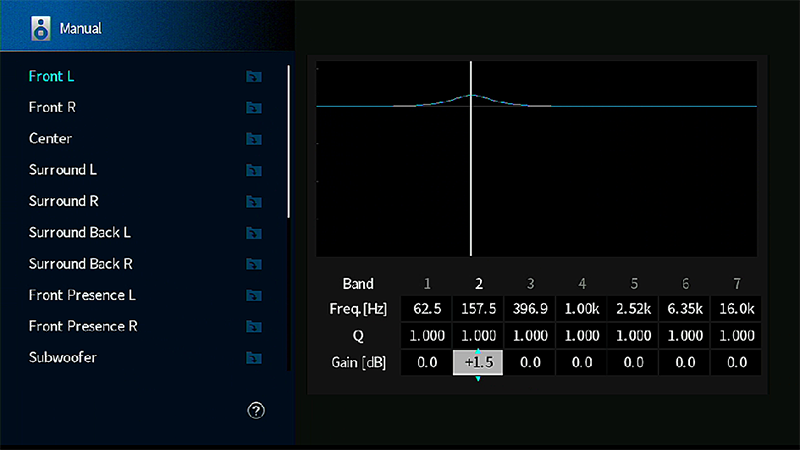
 

Yamaha on-screen parametric equalizer menu showing adjustment capability for frequency, bandwidth (Q) and dB.

Yamaha on-screen parametric equalizer menu showing adjustment capability for frequency, bandwidth (Q) and dB.


If you have a huge null that is more than a nominal few dB to deal with, you might put extreme power demands on your amplifier’s power supply and/or subwoofer’s power amp stage, and you might also be forcing your loudspeakers’ (and/or subwoofer’s) bass drivers to operate with an excessive amount of excursion that will likely sound poor or even tax the voice coil drivers well beyond their design parameters. (If you’ve ever heard a woofer bottom out, it’s not a pretty sound!)

When making an edit to our frequency response curve using EQ, it should be best viewed as a means of refining or fine-tuning a system, rather than trying to coax your speakers to make “something out of nothing.” Also, be aware that for every edit you make in boosting or cutting your frequency response, you are literally distorting the original signal.

So, the thought is that, less is more when it comes to making these tweaks. And that’s what they really should be – tweaks, rather than great carvings or boosts to your sound. If you have run your room correction software correctly, it’s likely it will already have done some volume balancing for the levels of each speaker and/or channel. Sometimes, these can already be at a surprisingly severe dB level.

Returning to the use of parametric EQ: often the software (whether in an A/V receiver or preamp/processor or on a computer) will allow you to make greater adjustments than is healthy for your system and for your ears. For example, it’s unlikely you would want to make a 6 dB boost at a Q of 0.4 with a center frequency of 60 Hz, because this will produce such a wide bass boost across three octaves that it will mush out your sound and strain your drivers.

We’ve noted that adding in too many adjustments detract from the “pure” audio signal, and that trying to compensate for a severe low-frequency null in the room could tax your amplifier and speakers. But you could damage your tweeter if you try to flatten out its octave drop-off curve using EQ, by adding so much power back into the response curve that you destroy your tweeter (and maybe even midrange drivers) in the quest for a flatter high end frequency response. How is this even possible?

It is related to the fact that the measured frequency response of the room, and what you see plotted as a curved line (in room measurement software), is not what you actually hear, nor what is being produced by the speakers. Your tweeter, if it has extended high-frequency response, may produce sound at frequencies beyond what your measurement microphone will be able to pick up. (Some ultrasonic microphones are sensitive up to 40 kHz but often not highly accurate, due to limitations of their diaphragms.) Before you decry this as complete nonsensical idiocy, let’s take a step back and look at how the response curve is generated in the first place – and this is perhaps the most pertinent reason why some people will frown on room correction software altogether.

The room measurements are made with a microphone, which interprets the sound in a way that is not the same as the human ear(s). We have a pair of ears for one thing, not just one, and a highly interpolative sound-filtering and compiling brain. Also, some of you will have observed, that by moving the measurement microphone just very small distances left or right from the primary on-axis listening position, you will see that the response curve varies, sometimes wildly. It is for this reason (and no doubt many others) that many room-correction software programs have been improved over the years to encourage more localized sampling close to the primary listening seat, rather than processing a summative set of data obtained from radically different microphone placements throughout a room, such as in the corners or close to the back wall.

What about comb filtering? This occurs when a sound arrives at our ears, or microphone, with a very small delay between the signals. The result: dips and peaks at certain frequencies that are sharp enough to look like the teeth of a comb when seen graphically. In the case of our ears, sound arrives at each ear at slightly different times and is interpreted by the brain as a spatial cue. But if you measure a room’s response with a microphone placed in those radically different locations (as recommended in some historical room-correction setup software), the measurements can be subject to comb filtering, which affects the accuracy of the room correction. With more modern room correction, more localized samples are usually called for, as this is far more representative of what the listener may hear. (Comb filtering may be accommodated for to some extent, a subject which is beyond the scope of this article.)
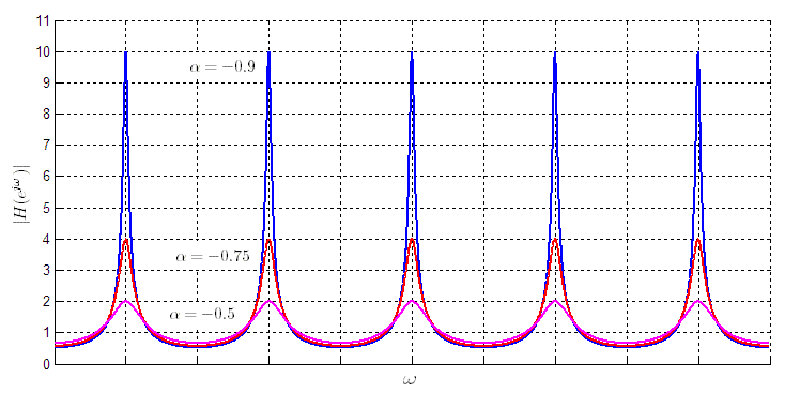
 

You can see why it's called comb filtering. Courtesy of Wikimedia Commons/Oli Filth.

You can see why it’s called comb filtering. Courtesy of Wikimedia Commons/Oli Filth.


Returning to making effective EQ changes: if you follow the principle of keeping the adjustments minimal, you may well be surprised by how much improvement you can make to your sound that you can actually hear and enjoy, as opposed to applying an overly-heavily-modified response curve that looks like what should sound good, but whose disadvantages outweigh the theoretical sonic benefits.

******

Postscript: in a perhaps related area of interest, you might want to check out the Polk Legend L800 loudspeaker. It’s been designed to cancel out interaural crosstalk interference from each speaker, using a technology the company calls SDA, or Stereo Dimensional Array. In real life, your left ear hears what your right ear hears, but with a slight delay, and vice versa for the right ear. This provides vital locational cues. However, with stereo speakers, ideally only the left ear should hear the left speaker, and the right ear the right speaker: but this doesn’t happen. Both ears hear signals from both speakers – interaural crosstalk. The L800 employs dedicated stereo main driver arrays, and separate stereo cancellation arrays, which deliver interaural crosstalk cancellation signals to your ears. SDA is designed to create a wider stereo soundstage with highly focused imaging.
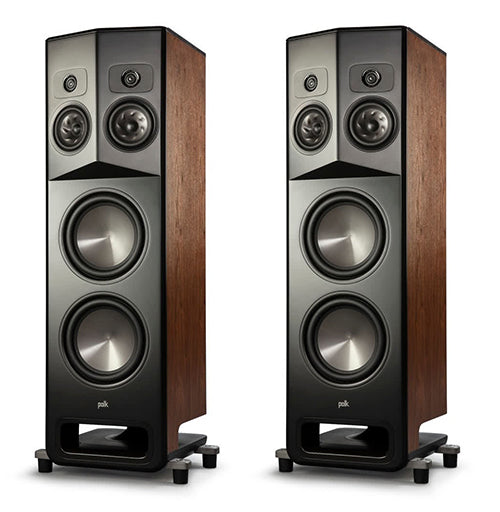
Polk Legend L800 loudspeakers.

Polk Legend L800 loudspeakers.


Header image: graph showing parametric equalization. Courtesy of Wikimedia Commons/Matias.Reccius.

More from Issue 159

View All Articles in Issue 159

Search Copper Magazine

#227 Seth Lewis Gets in the Groove With Take a Look Around: a Tribute to the Meters by Frank Doris Feb 02, 2026 #227 Passport to Sound: May Anwar’s Audio Learning Experience for Young People by Frank Doris Feb 02, 2026 #227 Conjectures on Cosmic Consciousness by B. Jan Montana Feb 02, 2026 #227 The Big Takeover Turns 45 by Wayne Robins Feb 02, 2026 #227 Music and Chocolate: On the Sensory Connection by Joe Caplan Feb 02, 2026 #227 Singer/Songwriter Chris Berardo: Getting Wilder All the Time by Ray Chelstowski Feb 02, 2026 #227 The Earliest Stars of Country Music, Part One by Jeff Weiner Feb 02, 2026 #227 The Vinyl Beat Goes Down to Tijuana (By Way of Los Angeles), Part Two by Rudy Radelic Feb 02, 2026 #227 How to Play in a Rock Band, 20: On the Road With Blood, Sweat & Tears’ Guitarist Gabe Cummins by Frank Doris Feb 02, 2026 #227 From The Audiophile’s Guide: Audio Specs and Measuring by Paul McGowan Feb 02, 2026 #227 Our Brain is Always Listening by Peter Trübner Feb 02, 2026 #227 PS Audio in the News by PS Audio Staff Feb 02, 2026 #227 The Listening Chair: Sleek Style and Sound From the Luxman L3 by Howard Kneller Feb 02, 2026 #227 The Los Angeles and Orange County Audio Society Celebrates Its 32nd Anniversary, Honoring David and Sheryl Lee Wilson and Bernie Grundman by Harris Fogel Feb 02, 2026 #227 Back to My Reel-to-Reel Roots, Part 26: Half Full – Not Half Empty, Redux by Ken Kessler Feb 02, 2026 #227 That's What Puzzles Us... by Frank Doris Feb 02, 2026 #227 Record-Breaking by Peter Xeni Feb 02, 2026 #227 The Long and Winding Road by B. Jan Montana Feb 02, 2026 #226 JJ Murphy’s Sleep Paralysis is a Genre-Bending Musical Journey Through Jazz, Fusion and More by Frank Doris Jan 05, 2026 #226 Stewardship by Consent by B. Jan Montana Jan 05, 2026 #226 Food, Music, and Sensory Experience: An Interview With Professor Jonathan Zearfoss of the Culinary Institute of America by Joe Caplan Jan 05, 2026 #226 Studio Confidential: A Who’s Who of Recording Engineers Tell Their Stories by Frank Doris Jan 05, 2026 #226 Pilot Radio is Reborn, 50 Years Later: Talking With CEO Barak Epstein by Frank Doris Jan 05, 2026 #226 The Vinyl Beat Goes Down to Tijuana (By Way of Los Angeles), Part One by Rudy Radelic Jan 05, 2026 #226 Capital Audiofest 2025: Must-See Stereo, Part Two by Frank Doris Jan 05, 2026 #226 My Morning Jacket’s Carl Broemel and Tyler Ramsey Collaborate on Their Acoustic Guitar Album, Celestun by Ray Chelstowski Jan 05, 2026 #226 The People Who Make Audio Happen: CanJam SoCal 2025, Part Two by Harris Fogel Jan 05, 2026 #226 How to Play in a Rock Band, 19: Touring Can Make You Crazy, Part One by Frank Doris Jan 05, 2026 #226 Linda Ronstadt Goes Bigger by Wayne Robins Jan 05, 2026 #226 From The Audiophile’s Guide: Active Room Correction and Digital Signal Processing by Paul McGowan Jan 05, 2026 #226 PS Audio in the News by Frank Doris Jan 05, 2026 #226 Back to My Reel-to-Reel Roots, Part 25: Half-Full, Not Empty by Ken Kessler Jan 05, 2026 #226 Happy New Year! by Frank Doris Jan 05, 2026 #226 Turn It Down! by Peter Xeni Jan 05, 2026 #226 Ghost Riders by James Schrimpf Jan 05, 2026 #226 A Factory Tour of Audio Manufacturer German Physiks by Markus "Marsu" Manthey Jan 04, 2026 #225 Capital Audiofest 2025: Must-See Stereo, Part One by Frank Doris Dec 01, 2025 #225 Otis Taylor and the Electrics Delivers a Powerful Set of Hypnotic Modern Blues by Frank Doris Dec 01, 2025 #225 A Christmas Miracle by B. Jan Montana Dec 01, 2025 #225 T.H.E. Show New York 2025, Part Two: Plenty to See, Hear, and Enjoy by Frank Doris Dec 01, 2025 #225 Underappreciated Artists, Part One: Martin Briley by Rich Isaacs Dec 01, 2025 #225 Rock and Roll is Here to Stay by Wayne Robins Dec 01, 2025 #225 A Lifetime of Holiday Record (and CD) Listening by Rudy Radelic Dec 01, 2025 #225 Little Feat: Not Saying Goodbye, Not Yet by Ray Chelstowski Dec 01, 2025 #225 How to Play in a Rock Band, Part 18: Dealing With Burnout by Frank Doris Dec 01, 2025 #225 The People Who Make Audio Happen: CanJam SoCal 2025 by Harris Fogel Dec 01, 2025 #225 Chicago’s Sonic Sanctuaries: Four Hi‑Fi Listening Bars Channeling the Jazz‑Kissa Spirit by Olivier Meunier-Plante Dec 01, 2025

Using EQ With Speakers: Some Limitations

Using EQ With Speakers: Some Limitations

In a previous article (Issue 158), we considered how it would possible to make meaningful adjustments to the in-room frequency response curve of our loudspeakers, by the use of a parametric EQ. We examined how we could find the frequencies we wanted to “edit” and which Q (or degree) of bandwidth we would want to adjust, using an analogy to f-stops in photography. (To recap: a parametric equalizer can adjust both the frequency range and the amount of peak or dip in the EQ curve applied.)

However, there are real-world limitations in what we can hope to achieve by making adjustments in the in-room response curve, so it seems like good idea to address what some of these limitations may be and why they exist in the way that they do.

One of the more common limitations that room correction software has, when used with a typical at-home speaker set up, is the expectation that with parametric EQ one should be able to make compensations for poor frequency response from the speaker itself. The reasoning may go something along the lines of, “I’m investing my money in high-quality room correction software and hardware in my A/V receiver (or preamp/processor), so I can save on putting more money into the speakers.” After all, the room correction software will offset the limitations of the speaker in the room because one can just boost the null points and trim off the peaks, right?

Although it is true you can boost some frequencies and cut others, the significance of having higher-quality rather than budget speakers in the first place cannot be underestimated. If you purchase lower-grade speakers with poor off-axis response and low sensitivity ratings, no amount of parametric (or graphic) can compensate for those limitations.

It’s true that a good parametric EQ will allow you to effectively boost and cut frequencies. However, keep in mind that it does this by increasing or decreasing them in the audio signal coming from the source material, before it gets to the speakers. The job of the parametric EQ is not really designed to compensate for the nulls that are a personality trait of your room/speaker interaction’s “frequency response.” If you have a huge dip in frequency at a given bandwidth, then no amount of boosting that null will really help to improve your sound. The null may well be a fundamental characteristic “suckout” of the room itself and simply trying to add more and more gain at that frequency could require more and more compensation than is healthy for a parametric EQ – and an amplifier – to provide. (Many software programs may allow you to boost or cut your dB by as much as 6 dB either way, which equates to a gigantic 12 dB range.)


Yamaha on-screen parametric equalizer menu showing adjustment capability for frequency, bandwidth (Q) and dB.

Yamaha on-screen parametric equalizer menu showing adjustment capability for frequency, bandwidth (Q) and dB.


If you have a huge null that is more than a nominal few dB to deal with, you might put extreme power demands on your amplifier’s power supply and/or subwoofer’s power amp stage, and you might also be forcing your loudspeakers’ (and/or subwoofer’s) bass drivers to operate with an excessive amount of excursion that will likely sound poor or even tax the voice coil drivers well beyond their design parameters. (If you’ve ever heard a woofer bottom out, it’s not a pretty sound!)

When making an edit to our frequency response curve using EQ, it should be best viewed as a means of refining or fine-tuning a system, rather than trying to coax your speakers to make “something out of nothing.” Also, be aware that for every edit you make in boosting or cutting your frequency response, you are literally distorting the original signal.

So, the thought is that, less is more when it comes to making these tweaks. And that’s what they really should be – tweaks, rather than great carvings or boosts to your sound. If you have run your room correction software correctly, it’s likely it will already have done some volume balancing for the levels of each speaker and/or channel. Sometimes, these can already be at a surprisingly severe dB level.

Returning to the use of parametric EQ: often the software (whether in an A/V receiver or preamp/processor or on a computer) will allow you to make greater adjustments than is healthy for your system and for your ears. For example, it’s unlikely you would want to make a 6 dB boost at a Q of 0.4 with a center frequency of 60 Hz, because this will produce such a wide bass boost across three octaves that it will mush out your sound and strain your drivers.

We’ve noted that adding in too many adjustments detract from the “pure” audio signal, and that trying to compensate for a severe low-frequency null in the room could tax your amplifier and speakers. But you could damage your tweeter if you try to flatten out its octave drop-off curve using EQ, by adding so much power back into the response curve that you destroy your tweeter (and maybe even midrange drivers) in the quest for a flatter high end frequency response. How is this even possible?

It is related to the fact that the measured frequency response of the room, and what you see plotted as a curved line (in room measurement software), is not what you actually hear, nor what is being produced by the speakers. Your tweeter, if it has extended high-frequency response, may produce sound at frequencies beyond what your measurement microphone will be able to pick up. (Some ultrasonic microphones are sensitive up to 40 kHz but often not highly accurate, due to limitations of their diaphragms.) Before you decry this as complete nonsensical idiocy, let’s take a step back and look at how the response curve is generated in the first place – and this is perhaps the most pertinent reason why some people will frown on room correction software altogether.

The room measurements are made with a microphone, which interprets the sound in a way that is not the same as the human ear(s). We have a pair of ears for one thing, not just one, and a highly interpolative sound-filtering and compiling brain. Also, some of you will have observed, that by moving the measurement microphone just very small distances left or right from the primary on-axis listening position, you will see that the response curve varies, sometimes wildly. It is for this reason (and no doubt many others) that many room-correction software programs have been improved over the years to encourage more localized sampling close to the primary listening seat, rather than processing a summative set of data obtained from radically different microphone placements throughout a room, such as in the corners or close to the back wall.

What about comb filtering? This occurs when a sound arrives at our ears, or microphone, with a very small delay between the signals. The result: dips and peaks at certain frequencies that are sharp enough to look like the teeth of a comb when seen graphically. In the case of our ears, sound arrives at each ear at slightly different times and is interpreted by the brain as a spatial cue. But if you measure a room’s response with a microphone placed in those radically different locations (as recommended in some historical room-correction setup software), the measurements can be subject to comb filtering, which affects the accuracy of the room correction. With more modern room correction, more localized samples are usually called for, as this is far more representative of what the listener may hear. (Comb filtering may be accommodated for to some extent, a subject which is beyond the scope of this article.)


You can see why it's called comb filtering. Courtesy of Wikimedia Commons/Oli Filth.

You can see why it’s called comb filtering. Courtesy of Wikimedia Commons/Oli Filth.


Returning to making effective EQ changes: if you follow the principle of keeping the adjustments minimal, you may well be surprised by how much improvement you can make to your sound that you can actually hear and enjoy, as opposed to applying an overly-heavily-modified response curve that looks like what should sound good, but whose disadvantages outweigh the theoretical sonic benefits.

******

Postscript: in a perhaps related area of interest, you might want to check out the Polk Legend L800 loudspeaker. It’s been designed to cancel out interaural crosstalk interference from each speaker, using a technology the company calls SDA, or Stereo Dimensional Array. In real life, your left ear hears what your right ear hears, but with a slight delay, and vice versa for the right ear. This provides vital locational cues. However, with stereo speakers, ideally only the left ear should hear the left speaker, and the right ear the right speaker: but this doesn’t happen. Both ears hear signals from both speakers – interaural crosstalk. The L800 employs dedicated stereo main driver arrays, and separate stereo cancellation arrays, which deliver interaural crosstalk cancellation signals to your ears. SDA is designed to create a wider stereo soundstage with highly focused imaging.

Polk Legend L800 loudspeakers.

Polk Legend L800 loudspeakers.


Header image: graph showing parametric equalization. Courtesy of Wikimedia Commons/Matias.Reccius.

0 comments

Leave a comment

0 Comments

Your avatar

Loading comments...

🗑️ Delete Comment

Enter moderator password to delete this comment:

✏️ Edit Comment

Enter your email to verify ownership: